
Level 4 · Roles · Practitioner
AI Customer Service: How to Use It Without Making Things Up
AI customer service works when the AI drafts replies from answers your company has already approved, and a person checks them before they go out. It goes wrong when the AI fills a gap with a policy nobody wrote. This guide covers six support tasks AI handles well, the prompts for each, and where to draw the line.
In 30 seconds
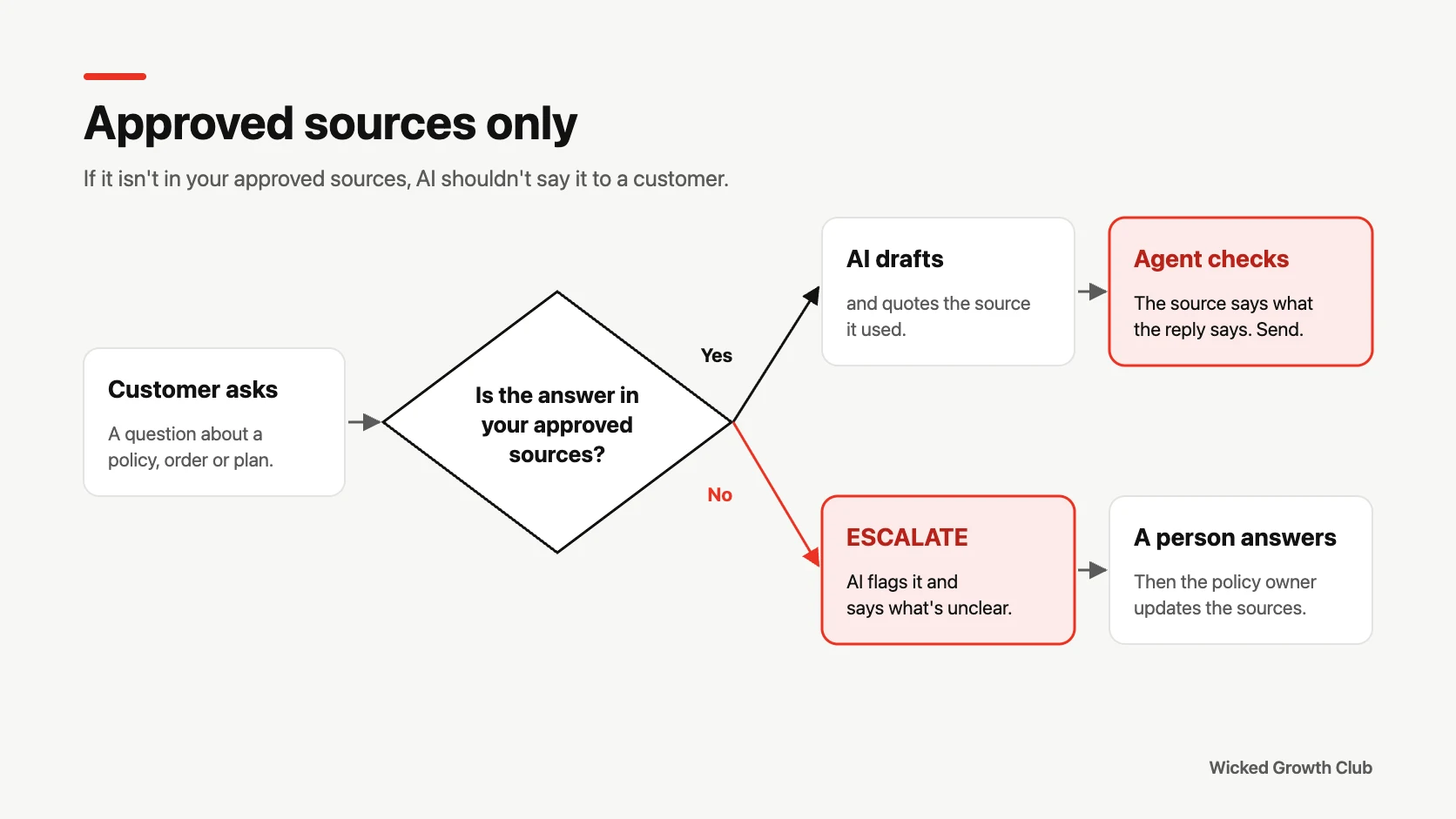
- Give the AI your approved sources and tell it to answer only from them. If the answer isn't there, it says so and passes the ticket to a person.
- Good uses: reply drafts, thread summaries, triage, tone rewrites, handoff notes and finding help center gaps.
- Keep refunds, exceptions, complaints and upset customers with people.
- Your company is responsible for what its chatbot tells customers. A tribunal held Air Canada to a wrong answer its bot gave.
- In the EU, and in some US states, you have to tell people when they're talking to AI.
Two cases worth knowing
Scroll sideways to see the whole table.
| Case | What the AI said | What happened |
|---|---|---|
| Air Canada, 2024 | The website chatbot told a grieving customer he could buy a full fare ticket and claim a bereavement discount afterward. The airline's written policy said otherwise. | In Moffatt v. Air Canada, 2024 BCCRT 149, the tribunal rejected Air Canada's argument that the chatbot was responsible for its own words. It found the airline liable for negligent misrepresentation and ordered it to pay the difference. |
| Cursor, April 2025 | An AI support reply told users that getting logged out was "expected behavior" under a new one device policy. There was no such policy. | Users posted about it publicly and some canceled. A co-founder apologized and said the AI had given an incorrect response (Fortune). |
In both cases the AI stated a policy with confidence, and nothing written backed it up. An AI that sounds sure while being wrong is hallucinating. In a support reply, the customer reads that as a promise from your company.
Answer only from approved sources
Most AI customer service mistakes come from the same gap: the AI was asked a question its sources didn't cover, so it guessed. You close that gap before the first ticket.
Gather the sources
Help center articles, the refund and return policy, shipping rules, warranty terms and your saved replies. Delete anything out of date.
Give them an owner
One person keeps them current. When a policy changes, updating the AI's sources is part of the change.
Write down what happens when the answer is missing
The AI says it doesn't know and hands off. "Let me get someone who can answer that" is a fine reply.
Ask for the source on every draft
The draft names the article or policy section it used, so the agent can check it quickly.
Before
Reply to this customer asking if they can get a refund after 45 days.
A typical result: "Yes, we can make an exception for you!" Nobody approved that.
After
Draft a reply to the customer email below. Use ONLY the refund policy and help articles I've pasted. At the end, in brackets, quote the section you used so I can check it and delete it before sending.
If the policy doesn't clearly answer their question, don't guess. Write "ESCALATE" and one sentence on what's unclear.
Never offer refunds, credits, exceptions or timelines that aren't written in the policy.
Customer email: [paste]
Policy and articles: [paste]
A typical result: a correct reply with its source, or an ESCALATE flag for a person to pick up.
How to use AI in customer service: six tasks
Scroll sideways to see the whole table.
| Task | What AI does | What the agent checks |
|---|---|---|
| 1. Reply drafts | Drafts from approved sources and cites them | The source actually says what the reply says |
| 2. Thread summaries | Turns a long thread into the issue, what's been tried and what's next | Nothing important was dropped |
| 3. Triage | Suggests a category, an urgency and whether a person must reply | Urgent or upset customers weren't missed |
| 4. Tone rewrites | Makes a correct reply calmer, shorter or clearer | No facts changed |
| 5. Handoff notes | Writes the note for the next shift or team | It matches the ticket |
| 6. Help center gaps | Finds questions your articles don't answer | Which gaps deserve an article |
The "after" prompt above covers reply drafts. Here are prompts for four of the others.
Prompt
Summarize a long thread for a handoff
Summarize this support thread for the agent taking it over: [paste thread].
Format: (1) the customer's issue in one sentence, (2) what's been tried, in order, (3) anything we've promised, quoted exactly, (4) what the customer is waiting on now, (5) the customer's mood in one word, with the line that shows it. Don't add anything that isn't in the thread.
Prompt
Suggest triage for a batch of tickets
For each ticket below, suggest a category (billing, technical, shipping, account, other), an urgency (today, this week, whenever) and whether a person must handle it before any reply (yes or no, with a reason). Mark yes for anything about refunds, legal threats, safety or cancellations, and for any customer who is clearly upset. Tickets: [paste, with names and contact details removed].Prompt
Calm a reply without changing the facts
Here is a correct reply to an upset customer: [paste]. Rewrite it to sound calmer and warmer. Acknowledge the frustration in the first sentence, keep it under 120 words, and keep every fact, date and step exactly as written. After the rewrite, list any fact you changed. The list should be empty.Prompt
Find what your help center doesn't answer
Here are 50 recent customer questions: [paste, with personal details removed]. Here are our help center article titles: [paste].
Group the questions by topic. For each group, name the article that answers it, or say there isn't one. Then list the five unanswered topics that come up most, with two example questions each.A week at Tallyline (a fictional company we use across our guides; it sells invoice automation to finance teams)
- Monday morning. The AI suggests triage for 60 overnight tickets and flags 7 for a person. One customer wrote "this is the third time I've asked." An agent takes those 7 first.
- Tuesday. A customer asks whether invoices sync with their accounting software. The draft cites the integrations article, the agent confirms it's right, and sends it.
- Wednesday. Someone asks for a refund on an annual plan 60 days in. The refund policy only talks about monthly plans, so the AI writes ESCALATE. The support lead makes the call and asks the policy owner to add a line about annual plans.
- Friday. The gap prompt shows "how do I add a second approver" came up 11 times with no article. An agent writes one that afternoon.
What stays with a person
Scroll sideways to see the whole table.
| Keep with a person | Why |
|---|---|
| Refunds, credits and exceptions | They commit the company's money |
| Cancellations and complaints | Saving the account takes judgment |
| Legal threats, safety issues, anything medical or financial | A wrong answer is expensive |
| Customers who are upset or vulnerable | A canned reply makes it worse |
| Questions the approved sources don't cover | This is where AI tends to guess |
Letting AI send replies with no person in between is a much bigger step than letting it draft. If your team is thinking about it, read AI Agents for Business first, and start with one narrow, low stakes question type, such as order status.
Telling customers it's AI
- In the European Union, the AI Act's transparency rules (Article 50) require that people are told when they're interacting with an AI system, unless that's already obvious. These duties apply from 2 August 2026.
- In the United States, some states have their own bot or AI disclosure laws, and they cover different things. Check the rules where your customers live.
Even where no law requires it, say so. One line is enough: "You're chatting with our AI assistant. Type 'agent' anytime to reach a person." Then test that typing "agent" really does reach a person.
A 30 day rollout
Week 1: sources
Gather and clean up the approved sources and name the owner. Put the approved sources rules into a shared prompt template.
Week 2: drafts only
Agents use AI for reply drafts and summaries, and a person sends everything. Count how many drafts needed fixing.
Week 3: add triage and tone
Each day, review a sample of the AI's triage suggestions. If it missed an urgent ticket, fix the rule that let it through.
Week 4: compare
Look at reply times and the share of drafts that needed fixing, against week 2. Run the gap prompt and write the two most needed articles.
Try it now
15 minutes, five real tickets
- Pick five tickets your team has already answered. Remove personal details.
- Paste your refund policy and two help articles into your company approved AI tool, along with the "after" prompt above.
- Compare its drafts with what your team actually sent. Did it cite a source each time? Did it escalate the ones it should have?
- Write down one rule to add to the prompt. Your team's template starts there.
Key idea
If it isn't in your approved sources, the AI shouldn't say it to a customer.
FAQ
How is AI used in customer service?
Mostly behind the scenes: drafting replies from approved answers, summarizing long threads, suggesting which tickets are urgent, rewriting tone and finding questions your help center doesn't answer. Some companies also run chatbots that answer customers directly. People still handle refunds, exceptions, complaints and anything the sources don't cover.
Is a company responsible for what its AI chatbot says?
Often, yes. In Moffatt v. Air Canada (2024), a Canadian tribunal held the airline liable for its chatbot's wrong answer about bereavement fares and rejected the argument that the chatbot was responsible for itself. Treat anything your AI tells a customer as your company's answer.
How do you stop an AI chatbot from making things up?
Limit it to a short set of approved, current sources, make it cite the source for every answer, and tell it to hand off to a person when the sources don't cover the question. Then spot check its replies every week.
Do you have to tell customers they're talking to AI?
In the EU, the AI Act's transparency rules require it from August 2026 unless it's obvious, and some US states have their own disclosure laws. Where it isn't required, it's still good practice.
Will AI replace customer service agents?
It takes over much of the drafting, summarizing and sorting. Customers with real problems, money questions or strong feelings still need a person, and how those conversations go decides whether customers stay.
Is there AI training for customer service teams?
Yes. Wicked Growth Club members get a customer service route with practice on real support work, and teams can join together. Whatever training you choose, look for one that uses your own tickets and policies and teaches people to check what the AI writes.
AI for Sales Certification
Train your support team on its own tickets
10 self paced sessions, recorded walkthrough videos and a graded capstone, all practiced on your own accounts. Membership is $50 a month. Add the $350 certification when you're ready.
Not sure where to start? Take the 2 minute assessment