
Level 4 · Roles · Practitioner
AI for Revenue Operations: Clean Data, Better Forecast Prep, Fewer Spreadsheets
AI for RevOps works best as an analyst that reads your exports and reports and never changes the CRM on its own. It finds messy records, drafts field definitions, preps forecast reviews, writes process docs and explains reports in plain words. The risk is familiar to anyone in RevOps: bad data spreading quickly. Below are six workflows with prompts, and a permission plan for CRM access.
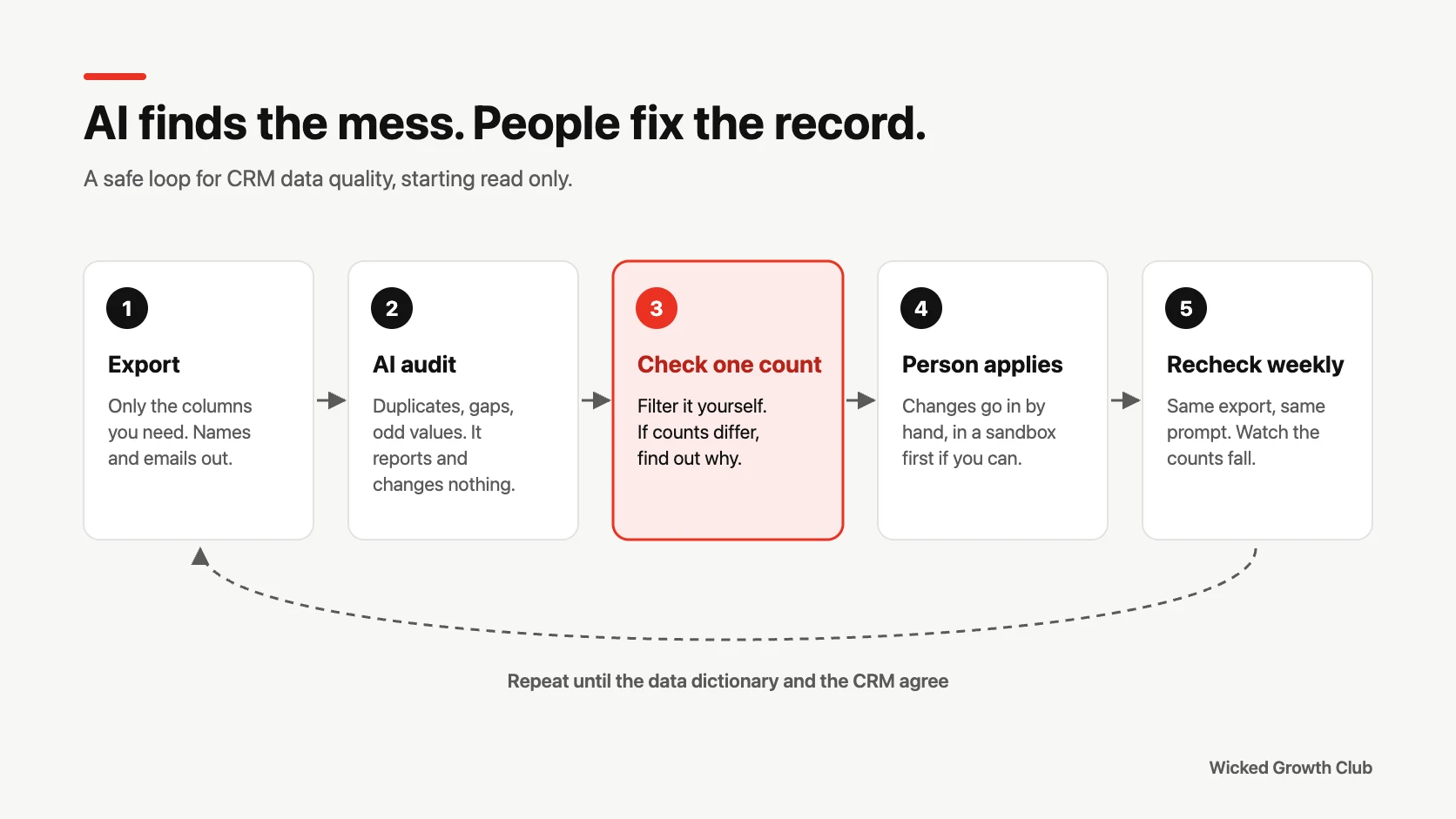
In 30 seconds
- Start read only. AI reads exports and reports, and people make the changes.
- A good first project is a data dictionary: what every field and stage actually means.
- Use AI to prepare the forecast review, not to produce the forecast. The number stays a human call.
- AI makes math and column mistakes, so check one number by hand in every analysis.
- Any automation that writes to the CRM needs an owner, a log and a way to undo it.
Where AI fits in RevOps
RevOps sits between sales, marketing, customer success and finance, and much of the job is getting everyone onto the same data and the same definitions. AI handles the reading, comparing and first drafts well.
Scroll sideways to see the whole table.
| RevOps job | AI helps with | You keep |
|---|---|---|
| Data quality | Finding duplicates, gaps and odd values in exports | Deciding what to merge, fix or delete |
| Definitions | Drafting field and stage definitions from how they're used | Agreeing them with sales, marketing and finance |
| Forecasting | Summarizing changes, listing risks, drafting questions | The forecast number and the call |
| Reporting | Explaining reports in plain words; spotting what changed | Which numbers the business runs on |
| Process | Turning notes into docs, checklists and training | How the process should work |
| Automation | Reviewing rules for gaps and conflicts | What gets automated and who owns it |
The permission plan
The CRM is your company's system of record. Give AI access the way you'd give it to a new hire: a little at a time.
Exports only
AI works on exported files or reports. Nothing it does can change the CRM.
Read only connection
If your company approves a connector, AI can read records directly but not change them. Check your CRM's and AI tool's current documentation for what each connection can do.
Suggested changes
AI writes a list of proposed changes. A person reviews and applies them, ideally in a sandbox first.
Approved automation
A narrow automation writes to specific fields, with an owner, a log and a tested way to undo it.
Steps 1 to 3 cover most of what teams need. Before step 4, read what to automate and how to limit AI agents.
Workflow 1: The data dictionary
Reports, forecasts and routing all get easier once everyone agrees what "qualified," "commit" and "closed lost" mean. AI can draft the dictionary from how the fields are actually used.
Prompt
Draft field and stage definitions
Here's a list of our CRM deal fields and stages with a sample of 30 deals (names removed): [paste].
For each field and stage, draft: (1) a one sentence definition, (2) who should fill it in and when, (3) allowed values, and (4) any sign in the sample that people use it differently. Mark every definition as DRAFT. Where the sample suggests two different meanings, describe both instead of picking one.
Then take the drafts to a short meeting with sales, marketing and finance, and use the places where the AI found two meanings as the agenda.
Workflow 2: Data quality audit
Prompt
Find what's wrong in an export
Here's an export of open deals with these columns: [list columns]. [Attach or paste the export, with personal details removed.]
Find: (1) likely duplicates, with the reason, (2) required fields that are empty, by field, (3) values that look wrong, like close dates in the past on open deals or amounts far outside the normal range, (4) deals with no activity in 30 days. Give counts for each, and list the first 10 rows for each problem. Don't change anything; just report.Workflow 3: Forecast review prep
Use AI to prepare for the forecast conversation, not to make the forecast.
Before
What will we close this quarter?
A typical result: a precise looking number with nothing behind it you could defend.
After
Here are this week's and last week's open deal exports for this quarter, with stage, amount, close date, owner and next step. [Attach, personal details removed.]
Prepare notes for our forecast review: (1) deals that moved stage, amount or close date since last week, (2) deals in late stages with no next step or no activity in 14 days, (3) close dates pushed more than once, (4) five questions to ask reps. Show the math for every total. Don't predict what we'll close.
A typical result: a short list of changes and risks for managers to walk through, with totals you can check.
Managers can use these notes in pipeline reviews. See AI for Sales Managers for the coaching side.
Workflow 4: Pipeline questions in plain words
Prompt
Explain a report to someone outside RevOps
Here's our monthly pipeline report: [paste or attach]. Explain it for a team leader who doesn't work in RevOps: (1) what this report measures, in two sentences, (2) the three biggest changes since last month, with numbers, (3) one thing that's easy to misread in this report. Under 200 words, plain language, no jargon.Prompt
Plan a report before you build it
A sales leader asked: "[paste their question, for example 'are we losing more deals to no decision this year?']".
Tell me: which fields and filters would answer this in a CRM report, what the report could get wrong (for example, fields that weren't required last year), and two follow up questions to ask the leader before I build it. Use our data dictionary: [paste].
Workflow 5: Process docs people read
Prompt
Turn process notes into a one page guide
Here are my notes on our lead handoff process from marketing to sales: [paste notes].
Write a one page guide for reps: the steps in order, what to fill in at each step and why it matters, and the three most common mistakes. Then write five quiz questions a new rep could answer after reading it. Flag any step in my notes that's unclear or contradicts another.
Workflow 6: Review routing and automation rules
Prompt
Find gaps and conflicts in your rules
Here are our lead routing and deal automation rules, written out in plain words: [paste].
Find: (1) leads or deals no rule would catch, (2) two rules that could both fire on the same record, (3) rules that depend on fields our data dictionary says are often empty, (4) anything that would send an email or change an owner without a person seeing it. Give a made up example record for each problem.A month with Tallyline's RevOps lead (a fictional company we use across our guides; it sells invoice automation to finance teams)
- Week 1. The data dictionary prompt finds that "Stage 3" means "demo booked" to one sales team and "demo done" to another. A 30 minute meeting fixes the definition.
- Week 2. The quality audit finds 140 open deals with close dates in the past. The RevOps lead filters by hand and gets 138: two rows were repeated headers in the export. Each rep gets their list.
- Week 3. The forecast prep notes show four late stage deals with no next step. Managers ask about them in the review, and two turn out to be lost.
- Week 4. The rules review shows that partner leads from one form match no routing rule, so they've been sitting unassigned. Fixing it takes ten minutes.
Try it now
20 minutes, with one export
- Export open deals with 6 to 10 columns. Remove names and emails.
- Run the data quality audit prompt in your company approved AI tool.
- Check one problem's count by hand.
- Pick the single problem that would most improve your next forecast, and send it to the reps who own those deals.
Key idea
Let AI find the mess and draft the fix. Keep a person's hands on every change to the system of record.
FAQ
How is AI used in revenue operations?
RevOps teams use AI to find data quality problems in exports, draft field and stage definitions, prepare forecast reviews, explain reports in plain words, write process docs and review automation rules for gaps. The changes to the CRM stay with people.
Should AI have write access to our CRM?
Not at first. Start with exports, then a read only connection if your company approves one, then AI suggested changes that a person applies. Give AI write access only for a narrow, logged automation with an owner and a tested way to undo it.
Can AI forecast sales?
AI can prepare the forecast conversation by summarizing what changed, flagging risky deals and listing questions. The forecast number should stay a human judgment that managers can explain and defend.
What's the best first AI project for RevOps?
A data dictionary. Drafting definitions for every field and stage from real usage is quick and low risk, and reporting, forecasting and automation all depend on it.
How do we keep AI from getting the numbers wrong?
Ask it to show its math, check at least one number by hand in every analysis, and keep the data dictionary in the prompt so it uses fields the way your team does.
Is there an AI course for RevOps?
Yes. Wicked Growth Club members get a revenue operations route with practice on real RevOps work, and teams can join together. Whatever you choose, look for training that uses your own data and teaches people to check the output.
AI for Sales Certification
Practice these workflows on your own CRM data
10 self paced sessions, recorded walkthrough videos and a graded capstone, all practiced on your own accounts. Membership is $50 a month. Add the $350 certification when you're ready.
Not sure where to start? Take the 2 minute assessment