
Practitioner · Level 2: Core skills
AI Business Continuity Plan: A One Page Outage Plan for Your AI Tools
An AI business continuity plan says what your team does when an AI tool it relies on stops working. It fits on one page: where AI sits in your work, how long each piece can wait, how a person does it by hand, who makes the call and how you'll find out. Most teams can write one in about an hour with the template below.
In 30 seconds
- AI tools go down, slow down, hit usage limits and change without notice. Decide what to do before it happens, not during.
- List every place AI sits in your work, then decide how long each can wait.
- For anything that can't wait, write a manual path a person could follow today.
- Name one person who decides when to switch, and say how staff will hear about it.
- Run a one hour drill on a quiet day. It shows you what the plan left out.
Why this matters now
On many teams AI now drafts replies, sorts tickets, summarizes calls and updates records every day. When the tool is down, that work stops, and people often realize nobody wrote down how it was done before.
AI services also run on other companies' infrastructure you never see. Two examples from late 2025:
Scroll sideways to see the whole table.
| Date | What happened | Source |
|---|---|---|
| Oct 19 to 20, 2025 | A timing bug in the system that manages DNS records for a core Amazon Web Services database left a key address empty in one region. The event ran from 11:48 PM PDT on October 19 to 2:20 PM PDT on October 20, and many apps that rely on that region were affected. | AWS post event summary |
| Nov 18, 2025 | A database permissions change at Cloudflare doubled the size of a configuration file past a software limit. Traffic for many websites and apps failed from about 11:20 to 17:06 UTC. Cloudflare said it was not a cyberattack. | Cloudflare post mortem |
Neither one started at an AI company, yet both broke tools that AI workflows depend on. Your AI step only works when every service underneath it works. You can't prevent your providers' outages, but you can decide in advance what your team does during one.
How AI tools fail
Being completely down is only one way AI tools fail. Plan for all four.
Scroll sideways to see the whole table.
| Failure | What it looks like | Example |
|---|---|---|
| Down | Errors, timeouts, nothing loads | The assistant won't open; automations fail every run |
| Slow or limited | Works, but slowly, or refuses some requests | Usage limits hit at month end; replies take minutes |
| Changed | Works, but behaves differently | A model update; a saved prompt now gives worse output |
| Quietly wrong | Works, looks fine, isn't | An automation keeps running but fills in a field incorrectly |
The last one does the most damage because nobody notices it. Your plan needs some way to catch it, such as a weekly spot check of a few outputs.
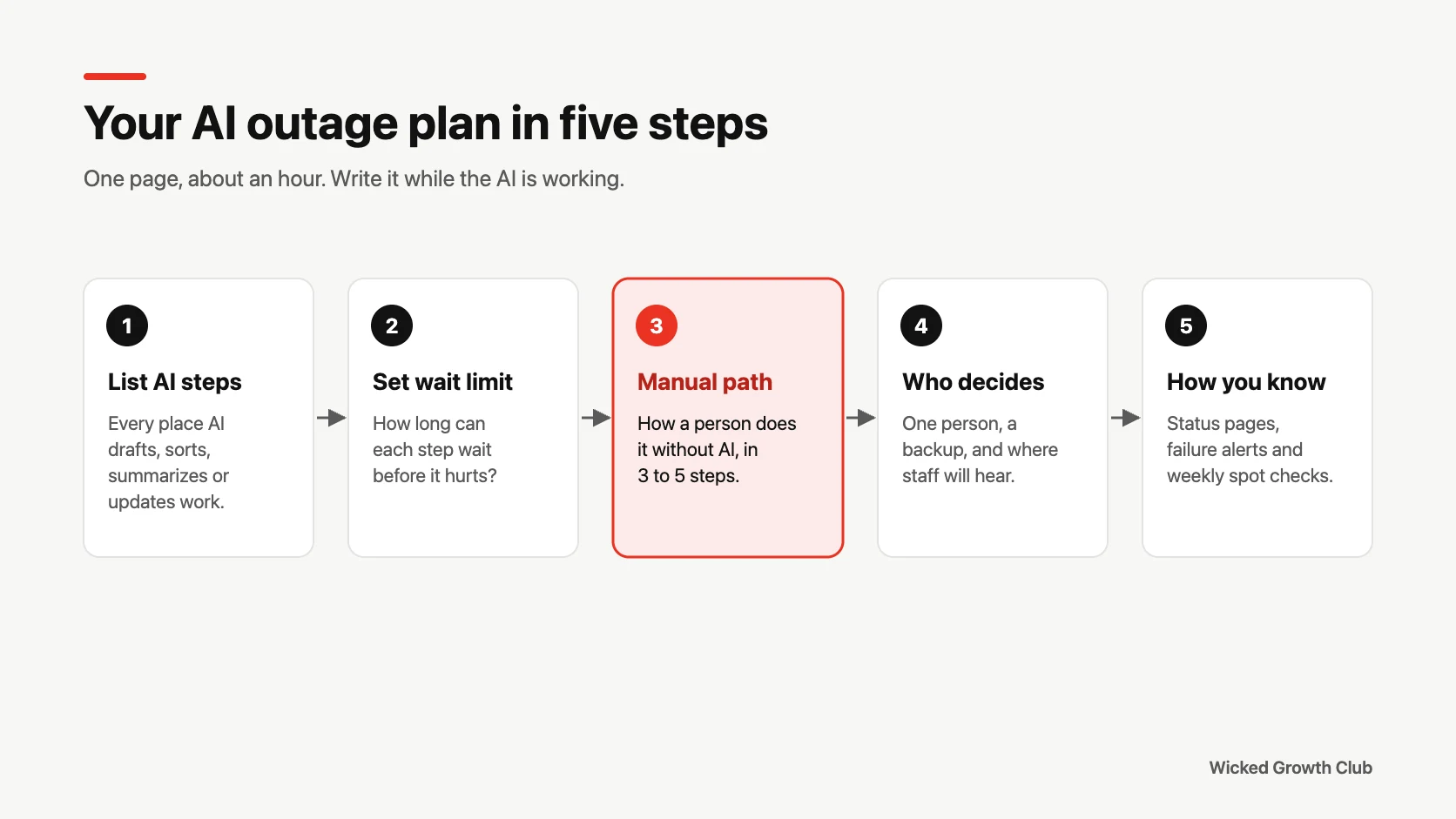
Build your plan in five steps
List every AI step
Go team by team. Where does AI draft, sort, summarize, decide or update something? Include automations, chat tools people use daily and AI features inside other software (your CRM, help desk or email).
Set the wait limit
For each step, how long can the work wait before it causes a problem: an hour, a day, a week? Most AI work can wait longer than people expect.
Write the manual path
For anything that can't wait a day, write how a person does it without AI, in 3 to 5 steps. If nobody remembers how, find out now, while things are calm.
Name who decides and how people hear
One person decides "we're switching to the manual path." Decide where the message goes (a chat channel, a text, an email) and who backs that person up.
Decide how you'll know
Status pages, an alert when an automation fails, or a weekly spot check for the "quietly wrong" failures.
Before: a plan that won't help on the day
"If the AI goes down, staff will do the work manually."
It doesn't say which work, which staff, what they should do or who tells them. When it happens, everyone waits for someone else to decide.
After: a plan someone can follow
"Support reply drafts. Wait limit: 2 hours. Manual path: use the saved reply templates in the help desk; senior agents take refund and billing tickets. Decides: support lead (backup: operations manager). Message: post in the support channel. How we know: help desk shows draft errors, or agents report it."
The one page template
Copy this into a doc or sheet, one row per AI step, or use the free download.
Download the template. The table, the four lines and the drill on one printable sheet. Download the PDF to print, or get the editable Word version. No email needed.
Scroll sideways to see the whole table.
| AI step | Tool it depends on | Wait limit | Manual path (3 to 5 steps) | Who decides (backup) | How we'll know | Last tested |
|---|---|---|---|---|---|---|
| Example: drafting customer replies | Help desk AI feature | 2 hours | Saved templates; seniors take billing tickets | Support lead (ops manager) | Draft errors; agent reports | [Date] |
Below the table, add four lines:
The four lines under your table
0 of 4 done
Ticks are saved in this browser only.
Use AI to write the plan
AI can draft most of this plan for you. Check every step it writes against how your team really works, because it will fill gaps with guesses that sound right.
Prompt
Find every AI step in a workflow
Here is how our team handles a typical week, in my own words: [describe the workflow, the tools you use and where AI is involved].
List every step where AI drafts, sorts, summarizes, decides or updates something, including AI features inside other software. For each, name the tool it depends on and what would stop if that tool were down for a day. Ask me about anything you're unsure of instead of guessing.
Prompt
Write the manual path
Our team uses AI for this step: [describe the step, for example "drafting first replies to support tickets from our help desk"].
Write a manual path a new team member could follow if the AI tool is down: 3 to 5 numbered steps, plain words, using only the tools listed here: [list tools that don't depend on AI]. Flag anything that needs a decision from a manager.
Prompt
Draft the outage message in advance
Write two short messages we can keep ready for when [tool] is down. (1) For staff: what's happening, that we're switching to the manual path, where the plan is, and who to ask. Under 60 words. (2) For customers, only if they're affected: an honest, calm note that replies may be slower today. Under 40 words. No promises about timing.Practice once
Until you've tried the plan, you don't know whether it works. One hour on a quiet day will show you.
Try it now
A 60 minute outage drill
- Pick one AI step from your table with a short wait limit.
- On a quiet morning, tell the team: "For the next hour, pretend [tool] is down."
- The person who decides sends the real message, and the team follows the manual path.
- Afterward, ask three questions: What was missing from the manual path? Did people find the plan? How long did the switch take?
- Fix the plan, and write today's date in the "Last tested" column.
Key idea
You can't stop your AI provider from going down. You can decide now what your team will do when it happens.
FAQ
What is an AI business continuity plan?
It's a short plan for keeping work moving when an AI tool your team relies on fails. It lists where AI sits in your work, how long each step can wait, the manual path, who decides to switch and how you'll find out.
Do small businesses need an AI outage plan?
Yes, if any daily work depends on AI. A one page plan takes about an hour. Small teams often depend on one or two people who know how the AI tools are set up, which makes a written manual path even more useful.
What should we do first when an AI tool goes down?
Check the provider's status page. Then the person who decides chooses between waiting and switching to the manual path, based on the wait limit in your plan.
How do we know if AI output is quietly wrong?
Spot check a few outputs every week against the source, especially from automations no one reads. Watch for changes after a tool update. A saved prompt that suddenly gives different results is a sign the model changed.
Should we use a second AI tool as a backup?
For work that can't wait, a second tool can help, but only if it's approved, set up and tested in advance. A backup nobody has logged into before won't help during an outage.
How often should we update the plan?
Review it whenever you add an AI tool or a new automation, and at least every quarter. Run a short drill at least twice a year.
AI for Sales Certification
Build AI habits that still work when the tools don't
10 self paced sessions, recorded walkthrough videos and a graded capstone, all practiced on your own accounts. Membership is $50 a month. Add the $350 certification when you're ready.
Not sure where to start? Take the 2 minute assessment